If you have registered a domain from CORNQ's Value Domains category, you can use our default nameservers to access Host Records and manage your domain's DNS records directly from the client portal.
This guide explains how to change your domain nameservers, which domain extensions currently support our Value Domain nameservers, and what to do if DNS management is unavailable.
You can browse and register supported domains from our Value Domains section.
CORNQ Value Domain Nameservers
To use CORNQ's DNS management and Host Records feature, configure your domain with the following nameservers:
Nameserver 01: sky.tld.bd
Nameserver 02: sea.tld.bd
Make sure both nameservers are entered correctly before saving the changes.
Supported Domain Extensions
The sky.tld.bd and sea.tld.bd nameservers currently support the following domain extensions:
.bro.al.dev.cv.sch.ac.store.cv.info.mp
Support for additional extensions may be added in the future.
How to Change Your Domain Nameservers
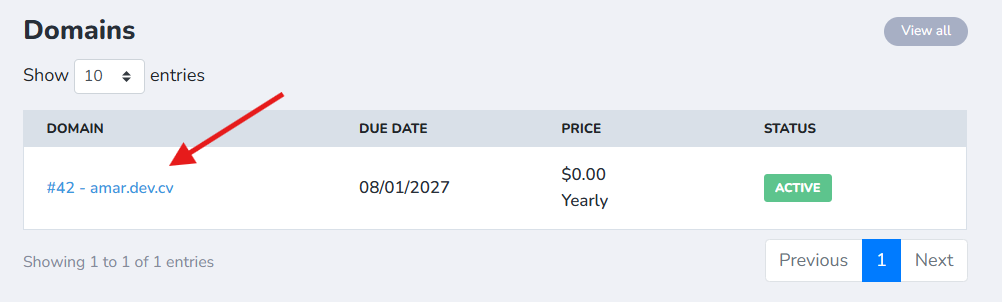
Log in to your CORNQ Client Portal, go to Dashboard & then the Domain Section. Enter the domain name you want to manage by clicking on it.
Navigate to the Nameservers section. Remove the existing nameservers and enter:
sky.tld.bd
sea.tld.bd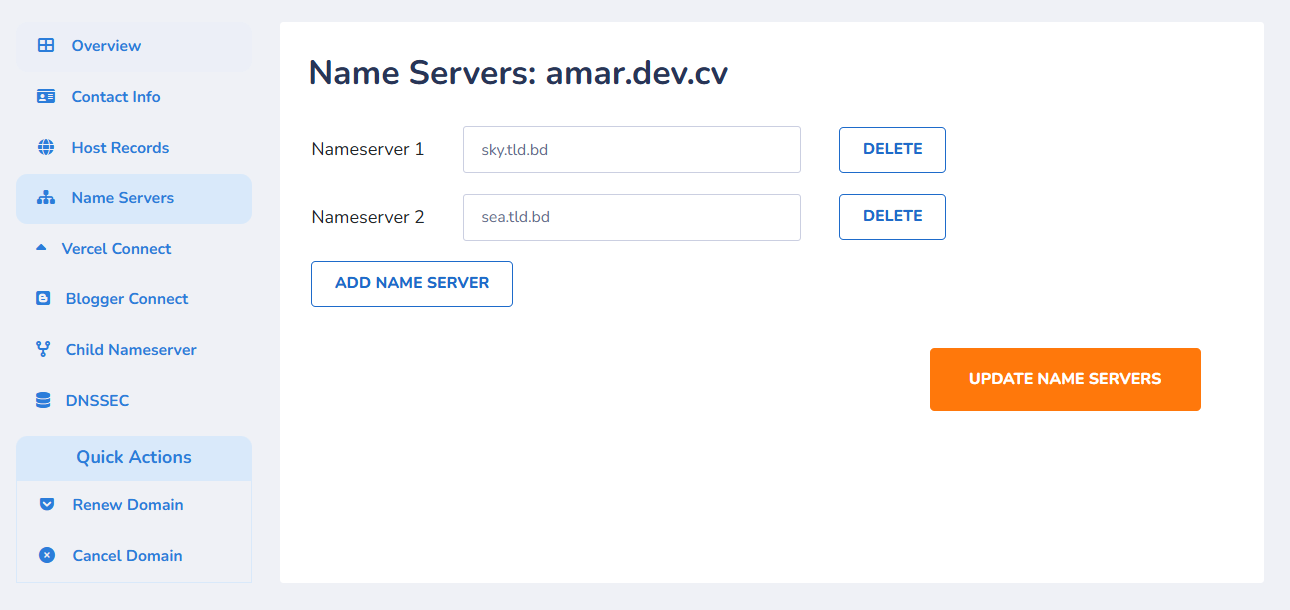
Then click Update Name Servers.
The nameserver change may take a few minutes to be detected by our system. DNS changes can also require additional time to propagate across DNS resolvers.
Once the new nameservers are detected, the Host Records feature will become available for your domain.
How to Manage DNS Records Using Host Records
After activating the CORNQ nameservers, open your domain again and go to Host Records.
You can use this section to configure the DNS records supported by your domain and DNS service.
Depending on the available configuration, these may include common DNS record types such as:
AAAAACNAMEMXTXT
Host Records allow you to point your domain to a website, configure subdomains, verify third-party services, configure email-related DNS records, and manage other DNS settings.
Troubleshooting: “Managing host records is not supported.”
If you see the following message:
Managing host records is not supported.
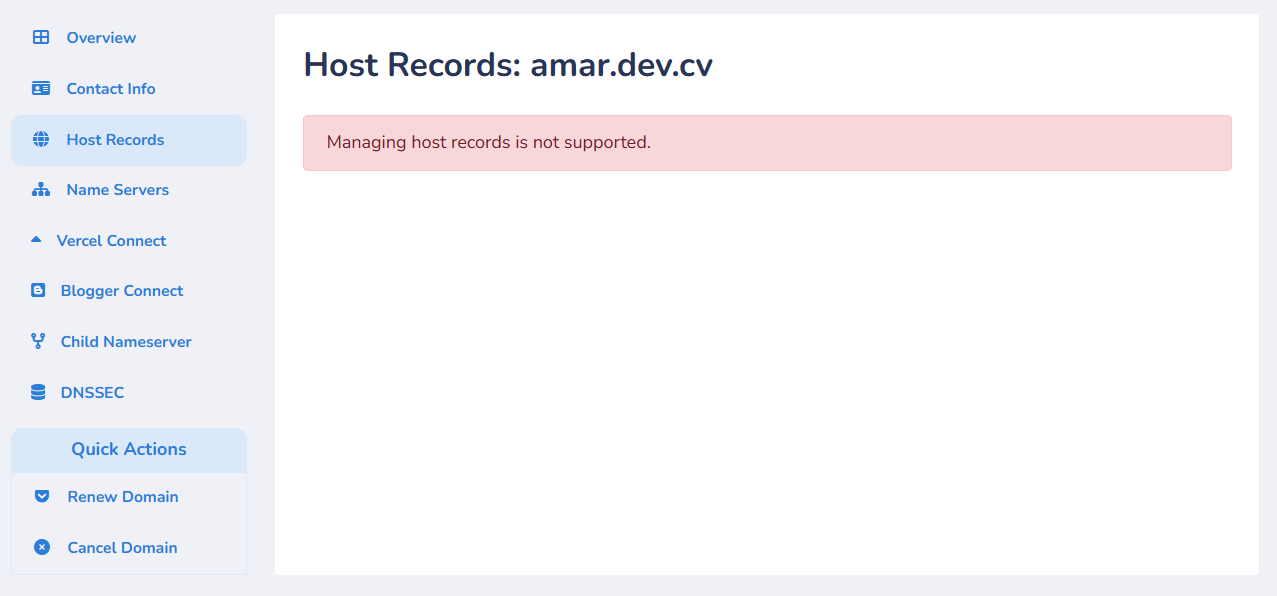
your domain is most likely not using the CORNQ default Value Domain nameservers.
Check the Nameservers section and make sure the domain is using exactly:
sky.tld.bd
sea.tld.bd
Save the changes and wait a few minutes before opening Host Records again.
The Host Records feature is available only when your supported Value Domain is using our default DNS nameservers.
Other Domain Management Features
Vercel Connect
You can use Vercel Connect to simplify the DNS configuration required to connect a supported domain to Vercel.
Blogger Connect
The Blogger Connect feature helps configure the DNS records required to connect your domain with Blogger.
Child Nameserver
Where supported, you can also use the Child Nameserver feature to create or manage private nameservers for your domain.
DNSSEC
Supported domains can continue to use the DNSSEC management feature while using the CORNQ nameservers.
Will Changing the Nameservers Affect My Domain?
Changing your nameservers to:
sky.tld.bd
sea.tld.bd
does not change your domain registration, ownership, or renewal status.
It changes which DNS service is authoritative for your domain.
If your domain already has an active website, email service, or other custom DNS configuration, make sure the required DNS records are configured under Host Records after switching nameservers. Missing DNS records can affect services that depend on them.
For a new Value Domain without an existing DNS configuration, you can simply change the nameservers and start managing your records through CORNQ.
Frequently Asked Questions
What are the nameservers for CORNQ Value Domains?
The default Value Domain nameservers are:
sky.tld.bd
sea.tld.bd
Why can't I manage DNS records for my domain?
If the portal displays “Managing host records is not supported.”, check whether your domain is using sky.tld.bd and sea.tld.bd.
Host Records are enabled only for supported domains using the CORNQ default nameservers.
How long does a nameserver change take?
The CORNQ portal may detect the change within a few minutes. However, DNS propagation across the internet may take longer depending on DNS caching and the previous configuration.
Can I use Vercel Connect or Blogger Connect after changing nameservers?
Yes. Supported domain-management features such as Vercel Connect, Blogger Connect, Child Nameserver, and DNSSEC remain available according to the capabilities of the domain extension.
Quick Summary
For a supported CORNQ Value Domain, change the domain nameservers to:
Nameserver 01: sky.tld.bd
Nameserver 02: sea.tld.bd
Save the changes and wait a few minutes.
Once the nameservers are detected, open Host Records to manage your domain's DNS records.